

z-git 开发日志
客户端基本数据结构构件
cmake用法. https://zhuanlan.zhihu.com/p/534439206


demo3

现代 Cmake
# 1. 指定最低版本(建议 3.10+,以支持更多现代特性)
cmake_minimum_required(VERSION 3.15)

# 2. 项目信息,自动定义 PROJECT_SOURCE_DIR 等变量
project(MyProject
        VERSION 1.0.0
        LANGUAGES CXX)

# 3. 设置 C++ 标准(现代做法)
set(CMAKE_CXX_STANDARD 17)
set(CMAKE_CXX_STANDARD_REQUIRED ON)

# 4. 添加子目录(子目录里会有自己的 CMakeLists.txt)
add_subdirectory(math)

# 5. 创建可执行程序目标
add_executable(MyApp main.cpp)

# 6. 核心:通过目标进行关联(Target-based)
# 即使 math 是子目录里的库,也直接链接目标名
target_link_libraries(MyApp PRIVATE MathFunctions)

# 7. 指定该目标特有的头文件路径(不再使用全局 include_directories)
target_include_directories(MyApp PRIVATE "${PROJECT_SOURCE_DIR}/include")


一些库
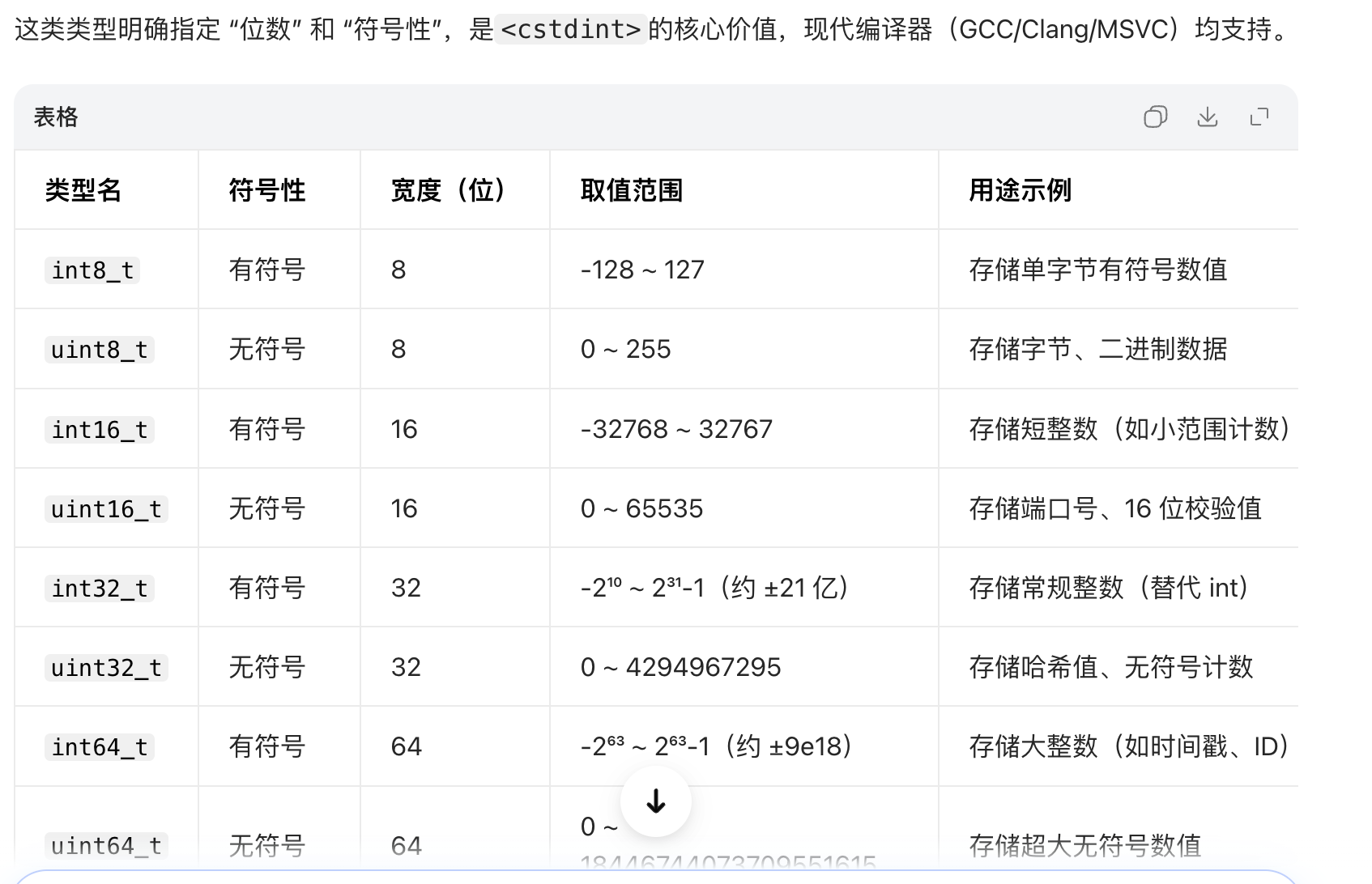
<cstdint>
namespace
namespace MyProject {
    int value = 42;

    void printMessage() {
        // 实现代码
    }

    class MyClass {
        // 类定义
    };
}
匿名 namespace
namespace {   // 匿名/无名 namespace

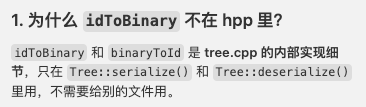
std::vector<std::byte> idToBinary(const ObjectId& id) { ... }
ObjectId binaryToId(const std::byte* data, size_t len) { ... }

} // namespace
匿名 namespace 的作用
内部链接(internal linkage):里面的符号只在当前 .cpp 内可见,别的 .cpp 看不到、也链接不到。
避免链接冲突:多个 .cpp 里若有同名函数,会报“多重定义”。放在匿名 namespace 里,每个 .cpp 各自有一份,互不影响。
替代 static:以前常用 static 做“文件内私有”,C++ 更推荐用匿名 namespace。
SHA1

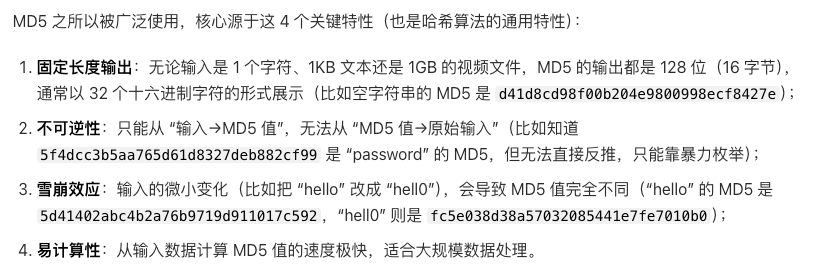
MD5
Blob and Tree 基本逻辑

static 逻辑
basic


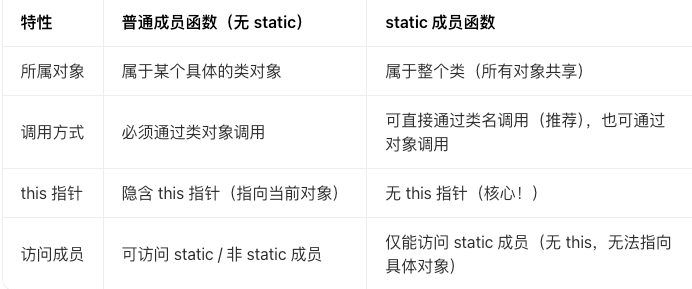
static成员函数
例子:
class Hash {
public:
    enum class Algorithm { SHA1, MD5 };

    /// 对二进制数据计算哈希,返回十六进制字符串
    static ObjectId compute(const std::vector<std::byte>& data, Algorithm algo = Algorithm::SHA1);
    static ObjectId compute(const std::byte* data, size_t len, Algorithm algo = Algorithm::SHA1);
    static ObjectId compute(const std::string& str, Algorithm algo = Algorithm::SHA1);

    /// 根据 ObjectId 获取存储路径
    /// SHA-1: prefix=前2位, suffix=后38位
    /// MD5:   prefix=前2位, suffix=后30位
    static std::pair<std::string, std::string> pathComponents(const ObjectId& id);
};
结合你的代码场景:
Hash是一个工具类(仅提供哈希计算、路径生成的功能,没有需要维护的实例状态,比如没有成员变量),因此把核心函数设计为static是最优选择 —— 不需要创建Hash对象,直接用Hash::compute(...)就能调用,简洁且符合工具类的语义。
namespace中套有class

enum 强类型枚举


const
const底层原理

const 与 非const 的转换


指针的四境界

当 const 成为成员函数限定符

运算符重载
basic


作为成员函数重载 和 作为全局函数重载


成员函数 全局函数 规则


友元


拷贝构造函数
样貌

用到的地方

指针问题


example

如图,由于 ostream 一般不能拷贝(拷贝构造函数被删除), 所以作为参数 和 返回值 时都要用&
默认构造函数
假如定义了 Blob类的一个默认构造函数
Blob() = default;那么调用
Blob{} 等价于:
调用 Blob 的默认构造函数
content_ 被初始化为空的 std::vector<std::byte>(size() == 0)
构造函数explicit Blob(ContentType content)并在实现中使用move ; 和声明成 explicit Blob(const ContentType &content); 哪一个更好
basic
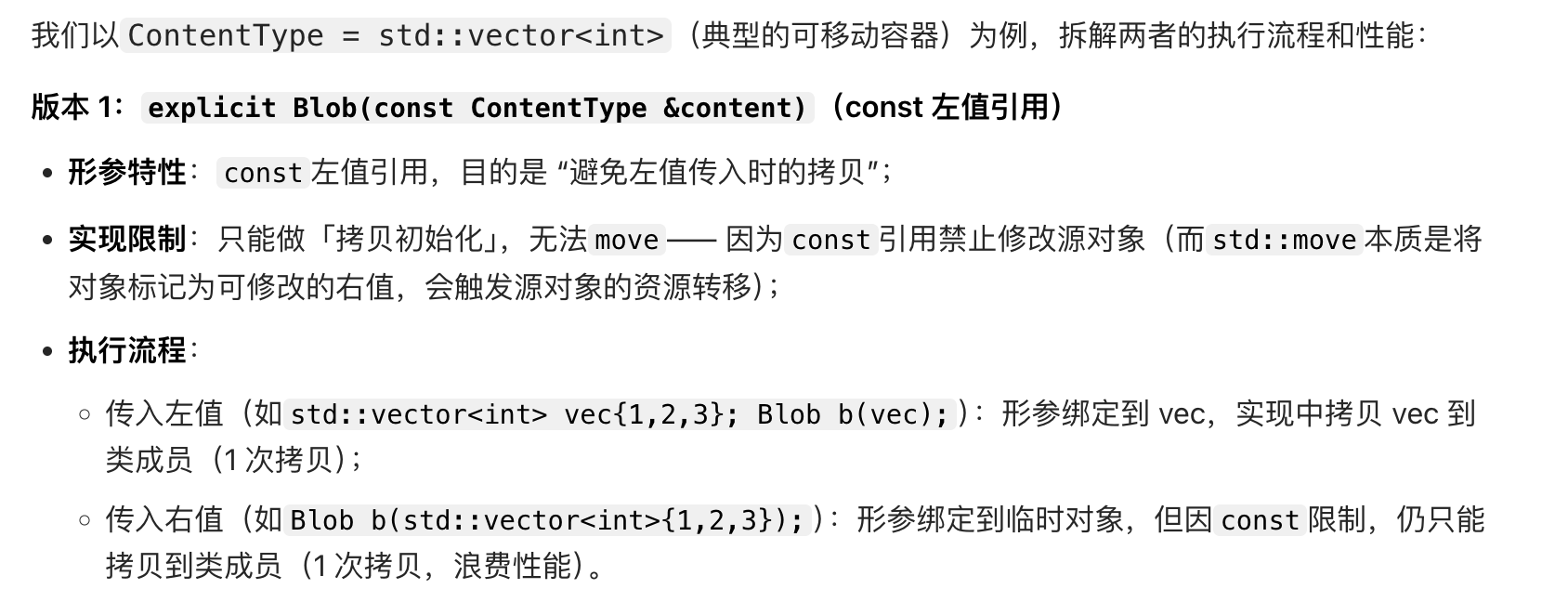
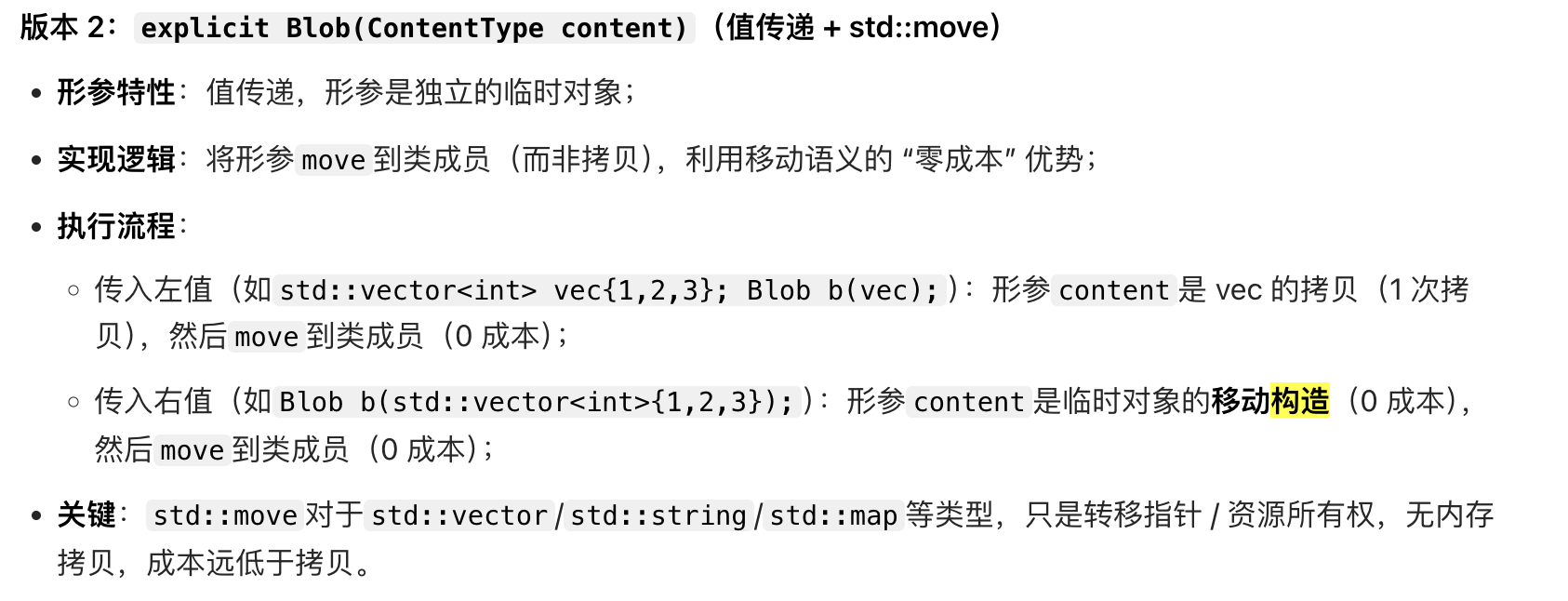
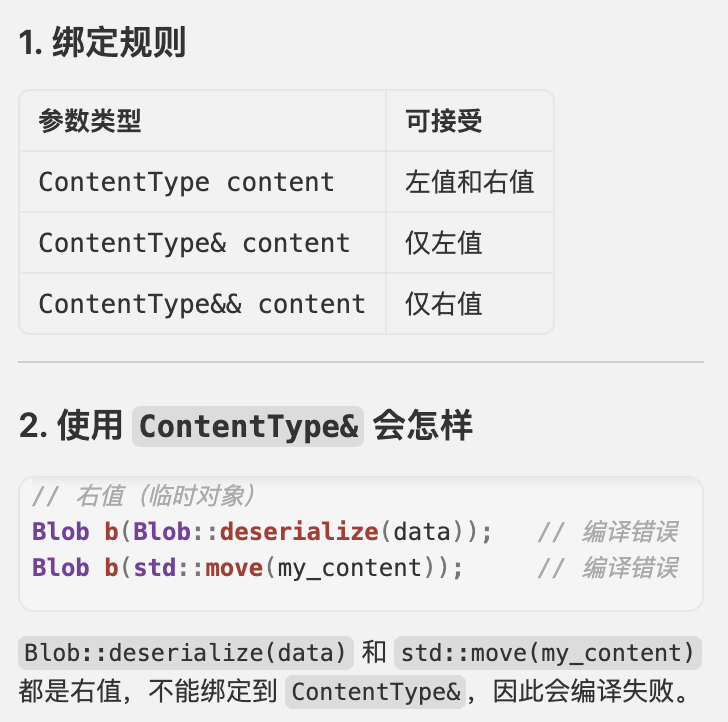
为什么 不用 Blob::Blob(ContentType& content) : content_(std::move(content)) {}
因为 非 const 左值引用 ContentType& 不能绑定到右值(临时对象)。
类的初始化,不同类型
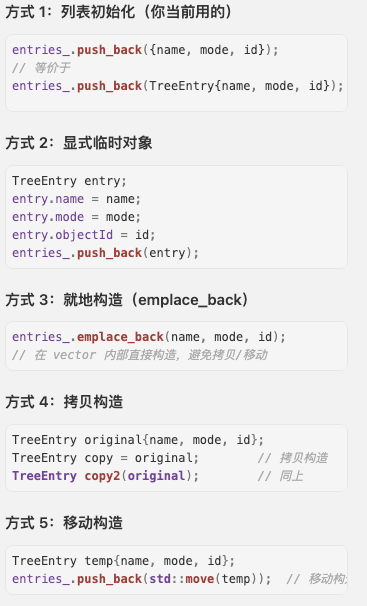
6: 自定义构造函数

struct TreeEntry {
    std::string name;
    std::string mode;
    ObjectId objectId;

    // 自定义构造函数
    TreeEntry(const std::string& n, const std::string& m, const ObjectId& oid)
        : name(n), mode(m), objectId(oid) {}

    // 委托构造
    TreeEntry() : TreeEntry("", "", "") {}
};

// 使用
entries_.push_back(TreeEntry(name, mode, id));
entries_.emplace_back(name, mode, id);
函数返回在哪些情况下不用&: 如果返回值是函数体内定义的局部变量,那肯定不能返回引用
std::vector<std::byte> serialize() const;函数返回 const char*

inline 介绍
为什么 有了 #pragma once 还需要 inline?

inline 的主要作用
在现代 C++ 中,
inline的性能优化(展开代码)作用已经淡化,更多是作为一种链接属性。


explicit

隐式转化的风险
#include <iostream>
#include <string>

// 包装一个整数的类
class Integer {
private:
    int value;
public:
    // 单参数构造函数(无explicit,会触发隐式转换)
    Integer(int val) : value(val) {}

    int getValue() const { return value; }
};

// 一个接收Integer对象的函数
void printInteger(const Integer& num) {
    std::cout << "数值是:" << num.getValue() << std::endl;
}

int main() {
    // 正常显式调用构造函数(没问题)
    Integer num1(10);
    printInteger(num1);  // 输出:数值是:10

    // 隐式转换:编译器自动把int(20)转换成Integer对象
    printInteger(20);  // 输出:数值是:20
    // 上面这行等价于:printInteger(Integer(20));
    // 但这种“自动转换”可能不是你想要的,甚至会导致逻辑错误

    return 0;
}explicit不能被继承:如果子类重写了父类的构造函数,需要重新加explicit;
explicit只影响隐式转换:显式调用构造函数(如Integer(20))永远有效。
vector
vector作为参数传入时也有可能会拷贝

vector 的迭代范围构造函数
std::vector<T> vec(iterator_first, iterator_last);用一对迭代器 [first, last) 表示的范围来构造 vector,并把该范围内的元素拷贝进新 vector。
push_back和emplace_back
两者都是向容器(如
vector、list、deque)末尾添加元素,但push_back是先构造(或拷贝)对象再放入容器,而emplace_back是直接在容器的内存空间里构造对象,少了拷贝 / 移动步骤,效率更高 —— 这是它们最核心的差异。
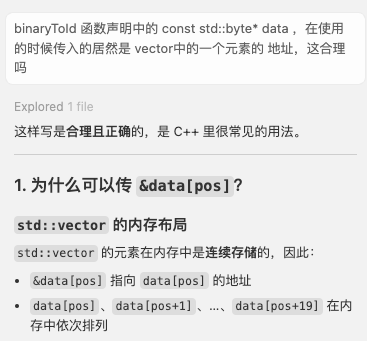
连续存储
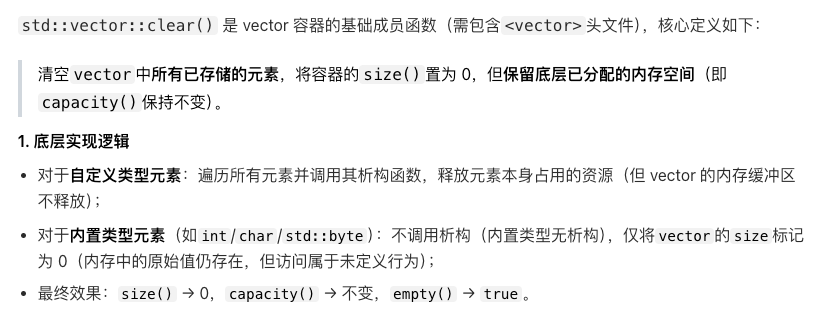
vector 的 clear
vector(first, last)表示 把 [first, last) 之间的元素拷贝进 vector
ex
std::vector<std::byte>(
    std::istreambuf_iterator<char>(ifs), //从 ifs 读取的输入迭代器,每次解引用得到一个 char
    std::istreambuf_iterator<char>() //默认构造的迭代器,表示“流结束”,作为 last
);
std::move

#include <iostream>
#include <vector>
#include <string>

int main() {
    std::string str1 = "Hello, World! I am a very long string...";

    // 1. 拷贝:str1 的内容被复制到 str2,两个字符串各自拥有一份数据
    std::string str2 = str1;

    // 2. 移动:std::move(str1) 将 str1 转为右值
    // 这里调用了移动构造函数,str3 直接接管了 str1 的内存指针
    std::string str3 = std::move(str1);

    std::cout << "str3: " << str3 << std::endl;
    std::cout << "str1 is now: " << str1 << std::endl; // 此时 str1 通常变为空

    return 0;
}
例子
// ContentType 通常是 std::vector<std::byte>
Blob::Blob(ContentType content) : content_(std::move(content)) {}
哪些参数 ,分别作为函数 的 传入值,返回值 的时候 会自动 加上 & 引用 或者 std::move 移动构造?
C++ 中没有 “自动加 & 引用” 的情况!引用(左值引用
T&、右值引用T&&)必须显式声明在参数 / 返回值类型中“自动触发移动构造” 本质是编译器识别到右值,自动按移动语义处理(而非真的 “加了 std::move”)
MyString func_return_local() {
    MyString local_str("局部变量");
    return local_str; // C++11+:自动视为右值→移动构造(无RVO时)
}

int main() {
    MyString d = func_return_local(); // 输出:移动构造(无RVO时)
    return 0;
}
不推荐 返回
std::move后的对象,因为 可能破坏 RVO
普通左值引用(T&)仅接收左值,传入右值必失败;const 左值引用(const T&)可接收左值 / 右值;右值引用(T&&)专门接收右值
创建数组
场景 1:栈上显式声明数组(安全,内存不会提前销毁)
#include <iostream>

int main() {
    // 步骤1:声明栈上数组(类型匹配:char而非int,避免截断)
    const char arr[] = {1,2,3,4,5}; // 数组内存分配在栈上
    // 步骤2:指针指向数组首元素
    const char* a = arr;

    // 安全:arr的生命周期是main函数作用域,只要main没结束,内存就有效
    for (int i=0; i<5; i++) {
        std::cout << (int)a[i] << " "; // 输出:1 2 3 4 5
    }

    return 0;
}
当然 arr[2] 这样子也是可以访问的
const char * 的常规用途(指向字符串字面量,安全)
#include <iostream>

int main() {
    // 字符串字面量"12345"存储在只读数据区,生命周期是程序全程
    const char* a = "12345";
    std::cout << a << std::endl; // 输出:12345(安全)

    return 0;
}注意:字符串字面量是只读的,不能修改(如
a[0] = '6'会触发段错误)
如果 const char* a = "12345"; 出现在。函数内,然后 我们从函数返回到了 主函数,那么 12345哈在只读数据区吗?程序还能访问 吗?
"12345"依然保存在只读数据区,生命周期贯穿整个程序运行期,只要主函数持有指向它的有效指针,就能安全访问;函数内的指针变量a虽然会销毁,但它指向的字符串本身不受函数作用域的影响。
.size() 方法
.size()的本质是 “元素个数”
以下都有成员函数 size()

全局函数 size()

C++11 之后,标准强制要求所有其他容器的 .size() 必须是 O(1)

因此 std::forward_list 没有size方法
.data() 方法


array 为固定大小, 数组长度在编译时确定,不能像 std::vector 那样动态扩容
#include <iostream>
#include <array>
#include <algorithm> // 用于排序

int main() {
    // 1. 定义与初始化 (类型, 长度)
    std::array<int, 5> myArr = {10, 50, 20, 40, 30};

    // 2. 访问元素
    std::cout << "第一个元素: " << myArr[0] << std::endl;
    std::cout << "第三个元素: " << myArr.at(2) << std::endl; // 使用 .at() 会进行越界检查,更安全

    // 3. 获取大小
    std::cout << "数组长度: " << myArr.size() << std::endl;

    // 4. 修改与填充
    myArr.fill(0); // 将所有元素设为 0

    // 5. 迭代器与排序 (配合 <algorithm>)
    myArr = {3, 1, 4, 1, 5};
    std::sort(myArr.begin(), myArr.end());

    // 6. 遍历
    for (const auto& val : myArr) {
        std::cout << val << " ";
    }

    return 0;
}
resize 方法
常见的动态容器

resize 的两种重载形式

哪些类没有resize

resize 和 reverse

下行转换(父类转子类)失败情形
什么时候会失败?

static_cast vs dynamic_cast 的选择 决定失败的后果


static_cast 不是只处理继承关系
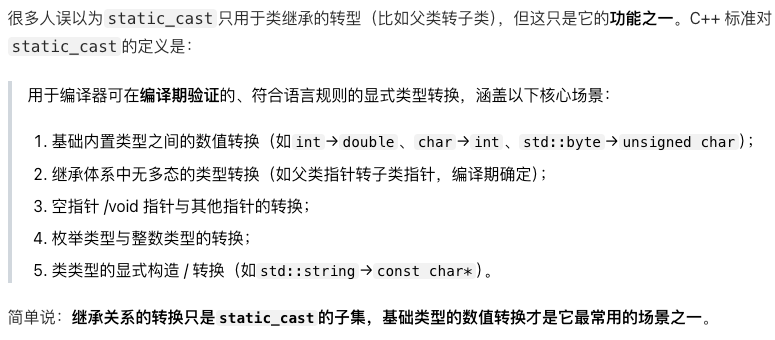
为什么dynamic_cast 必须有虚函数?

string
to_string
int num1 = 123;
std::string str1 = std::to_string(num1);
size_t

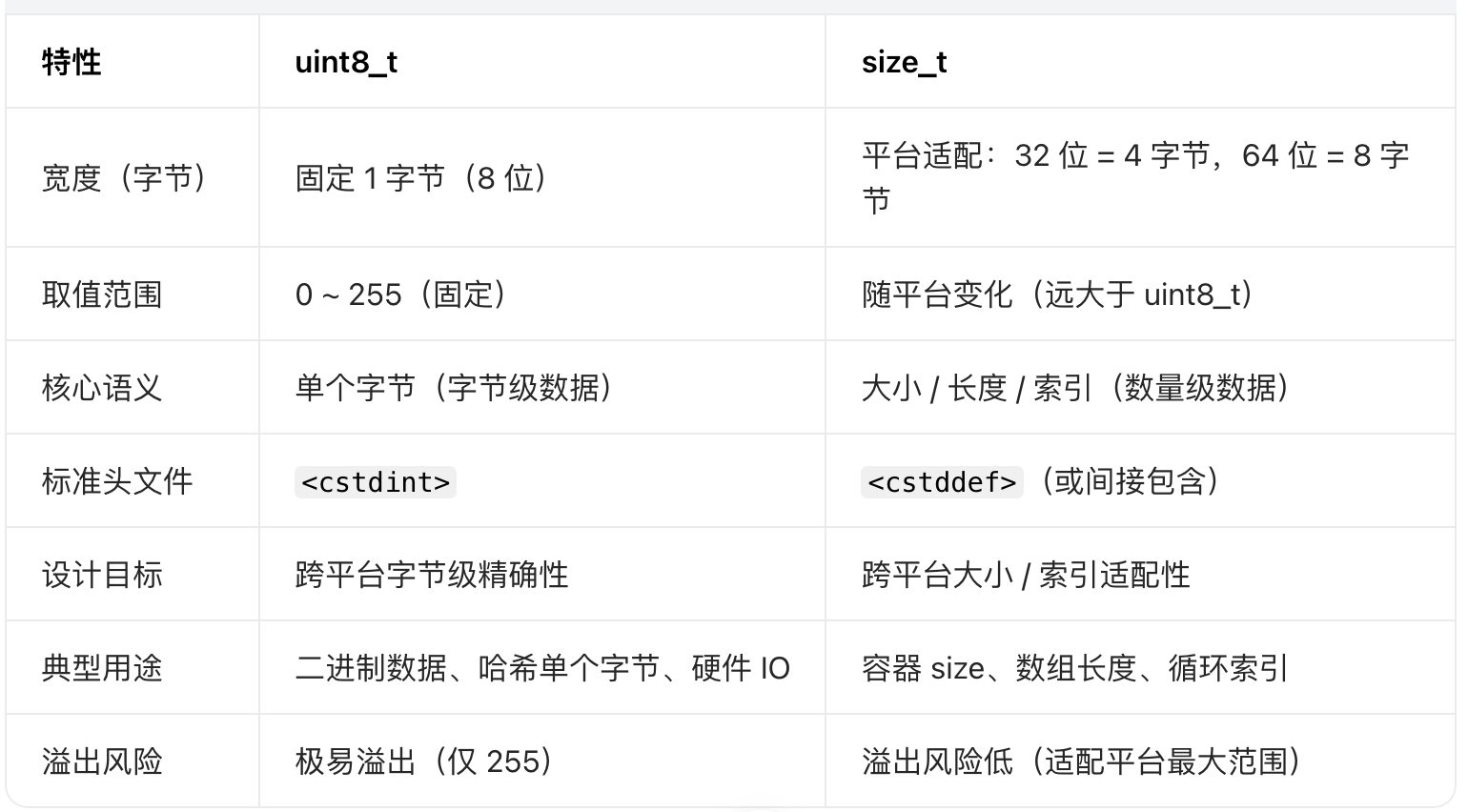
uint8_t 和 size_t
char
char 和 unsigned char的区别
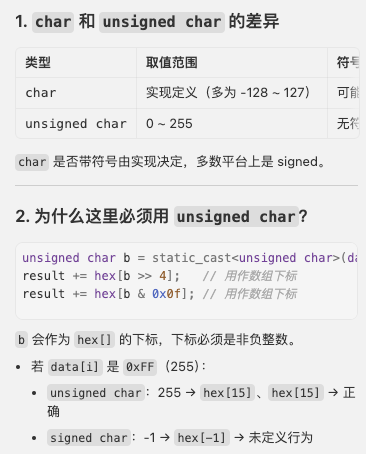
std::byte 一般考虑static_cast到 unsigned char,因为std::byte的设计初衷是表示「无符号的原始字节」(取值范围 0~255)
不用dynamicic_cast 是因为 byte 和 unsigned char 都是基础类,没有继承关系
std::ostringstream, 输入输出流的一种
basic
它是 C++ 标准库中在内存中拼接 / 格式化字符串的核心工具,相比直接拼接
std::string或使用sprintf,它更安全、更灵活
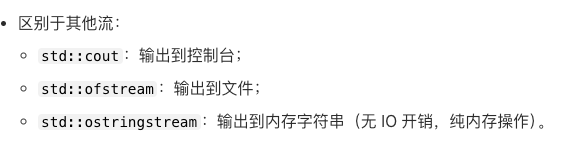
用法:创建对象 → 写入数据 → 导出字符串
a输入输出流
例子
oss << std::hex << std::setfill('0') << std::setw(2) << static_cast<int>(digest[i]);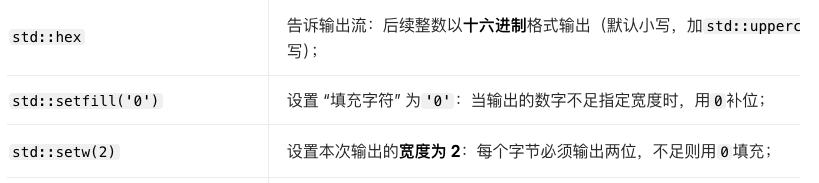
std::variant
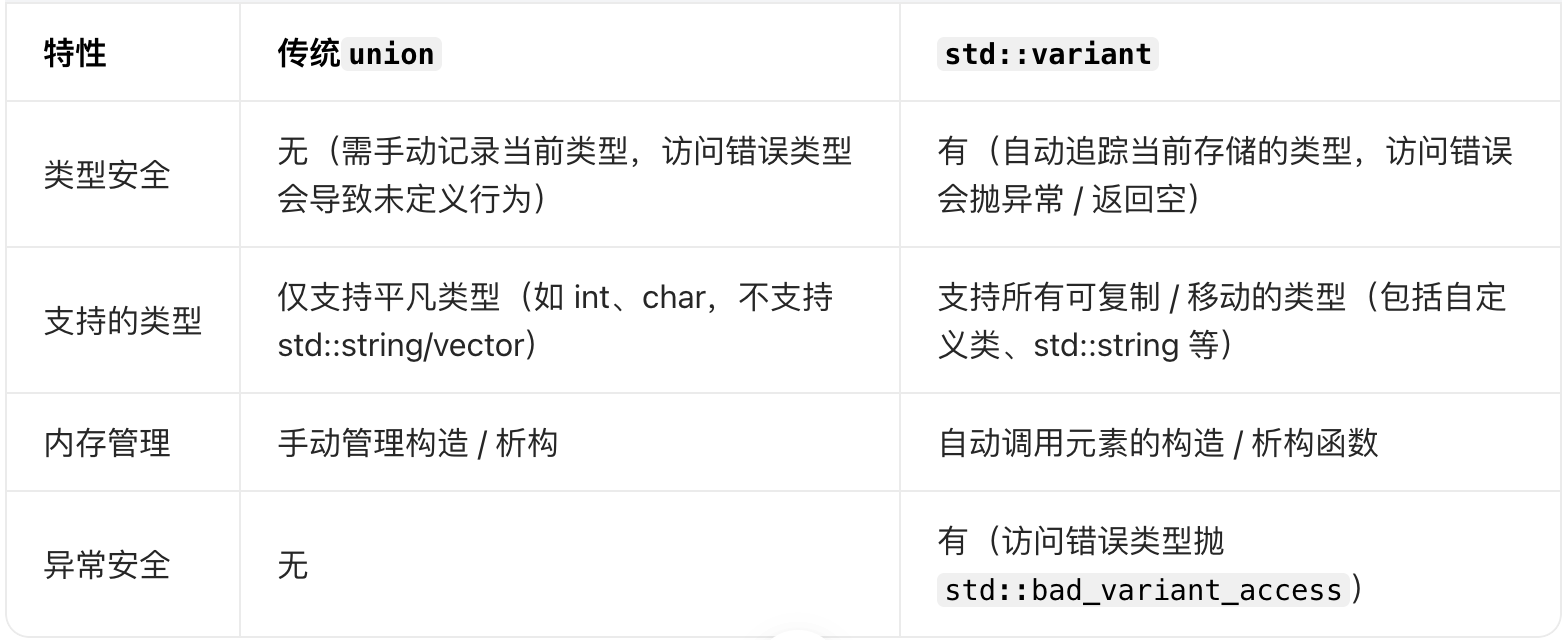
基本用法
#include <variant>
#include <string>
#include <iostream>

int main() {
    // 定义:variant可存储int、std::string、double中的一种值
    std::variant<int, std::string, double> var;

    // 初始化1:默认构造(存储第一个类型的默认值,此处int→0)
    std::cout << "默认值:" << std::get<int>(var) << std::endl; // 输出0

    // 初始化2:显式赋值为int类型
    var = 42;
    // 初始化3:赋值为std::string类型
    var = std::string("hello");
    // 初始化4:赋值为double类型
    var = 3.14159;

    return 0;
}
方式 1:按类型访问(std::get<类型>)
// 接上面的代码,var当前存储double类型3.14159
try {
    // 正确:访问当前存储的类型
    double val = std::get<double>(var);
    std::cout << "double值:" << val << std::endl; // 输出3.14159

    // 错误:访问非当前类型,抛异常
    int wrong_val = std::get<int>(var);
} catch (const std::bad_variant_access& e) {
    std::cout << "访问错误:" << e.what() << std::endl;
}
文件读写
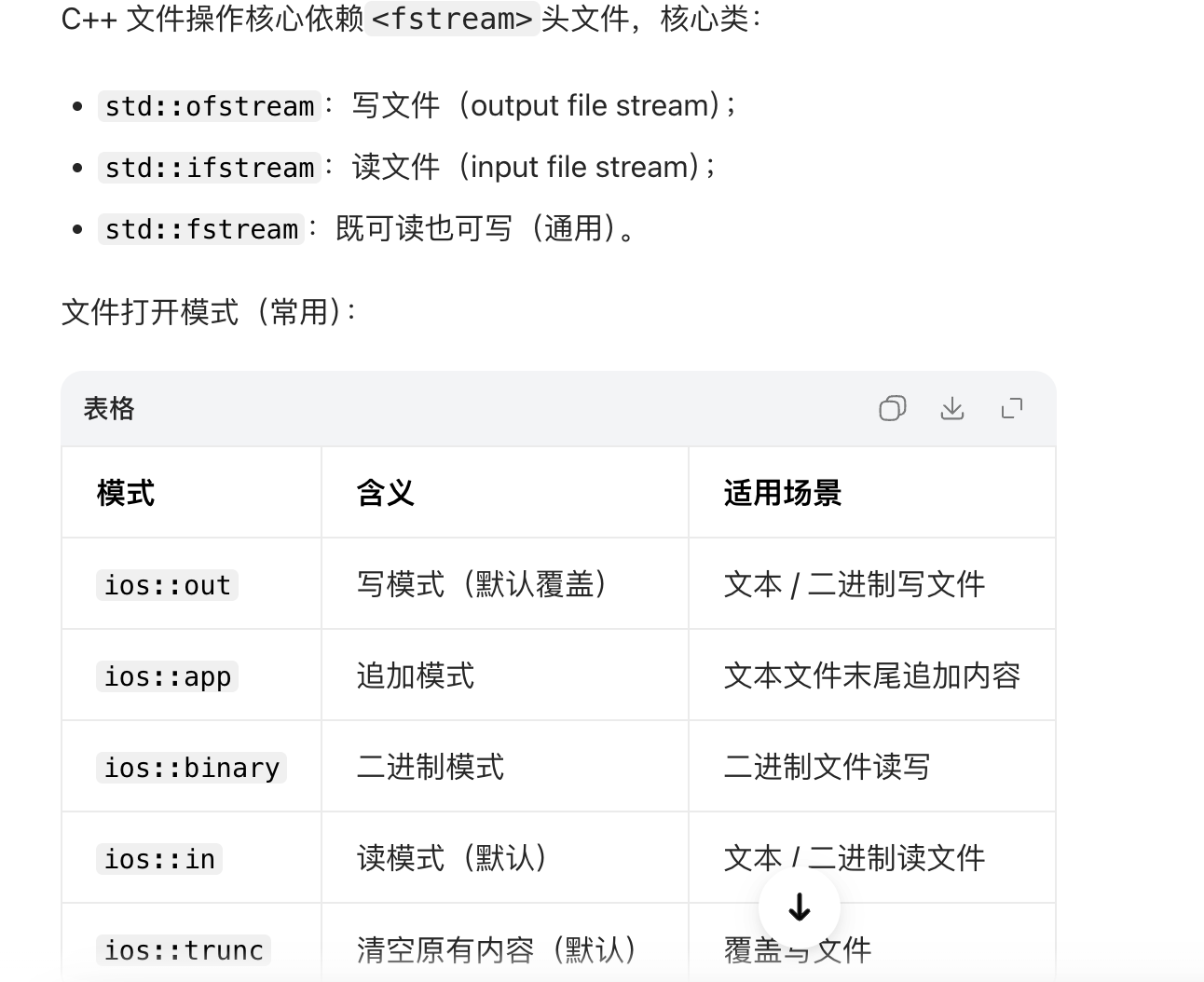
文本文件写入
#include <iostream>
#include <fstream>   // 必须包含的头文件
#include <string>

// 写文本文件:覆盖写入(若文件不存在则创建,存在则清空原有内容)
bool write_text_file(const std::string& file_path, const std::string& content) {
    // 1. 创建ofstream对象,指定文件路径和打开模式(ios::out为默认,可省略)
    std::ofstream ofs(file_path, std::ios::out);

    // 2. 检查文件是否成功打开(关键:必须检查,避免后续操作失败)
    if (!ofs.is_open()) {
        std::cerr << "错误:无法打开文件 " << file_path << " 进行写入!" << std::endl;
        return false;
    }

    // 3. 写入内容(用法和cout类似,支持<<运算符)
    ofs << content;

    // 4. 手动关闭文件(可选:ofs析构时会自动关闭,但显式关闭更规范)
    ofs.close();

    std::cout << "文本文件写入成功:" << file_path << std::endl;
    return true;
}

// 文本文件追加写入(在文件末尾添加内容,不覆盖原有内容)
bool append_text_file(const std::string& file_path, const std::string& content) {
    // 核心:打开模式改为 ios::app(append)
    std::ofstream ofs(file_path, std::ios::out | std::ios::app);
    if (!ofs.is_open()) {
        std::cerr << "错误:无法打开文件 " << file_path << " 进行追加!" << std::endl;
        return false;
    }

    ofs << content << std::endl; // 加endl换行,避免内容连在一起
    ofs.close();

    std::cout << "文本文件追加成功:" << file_path << std::endl;
    return true;
}

int main() {
    // 测试覆盖写入
    write_text_file("test.txt", "Hello, C++ 文件操作!\n这是第一行内容。");

    // 测试追加写入
    append_text_file("test.txt", "这是追加的第二行内容。");

    return 0;
}
文本文件读取
#include <iostream>
#include <fstream>
#include <string>
#include <vector>

// 按行读取文本文件,返回所有行的列表
std::vector<std::string> read_text_file(const std::string& file_path) {
    std::vector<std::string> lines; // 存储文件的每一行
    std::ifstream ifs(file_path, std::ios::in); // 读模式(默认,可省略)

    if (!ifs.is_open()) {
        std::cerr << "错误:无法打开文件 " << file_path << " 进行读取!" << std::endl;
        return lines;
    }

    // 按行读取:getline(流对象, 字符串变量) 读取一行(直到换行符,不包含换行符)
    std::string line;
    while (std::getline(ifs, line)) {
        lines.push_back(line);
    }

    ifs.close();
    return lines;
}

int main() {
    // 读取文件
    auto lines = read_text_file("test.txt");

    // 输出读取结果
    std::cout << "===== 读取文本文件内容 =====" << std::endl;
    for (size_t i = 0; i < lines.size(); ++i) {
        std::cout << "第" << i+1 << "行:" << lines[i] << std::endl;
    }

    return 0;
}
二进制文件写入
#include <iostream>
#include <fstream>
#include <vector>
#include <cstddef> // std::byte

// 写二进制文件:将字节数据写入文件
bool write_binary_file(const std::string& file_path, const std::vector<std::byte>& data) {
    // 核心:打开模式加 ios::binary
    std::ofstream ofs(file_path, std::ios::out | std::ios::binary);
    if (!ofs.is_open()) {
        std::cerr << "错误:无法打开二进制文件 " << file_path << " 进行写入!" << std::endl;
        return false;
    }

    // 写入二进制数据:write(数据指针, 数据长度)
    // 注意:需将std::byte* 转为 const char*(fstream的write要求char*)
    ofs.write(reinterpret_cast<const char*>(data.data()), data.size());

    ofs.close();
    std::cout << "二进制文件写入成功,字节数:" << data.size() << std::endl;
    return true;
}

int main() {
    // 准备二进制数据(示例:存储1,2,3,4,5的字节)
    std::vector<std::byte> binary_data;
    for (int i = 1; i <= 5; ++i) {
        binary_data.push_back(static_cast<std::byte>(i));
    }

    // 写入二进制文件
    write_binary_file("test.bin", binary_data);

    return 0;
}
二进制文件读取
#include <iostream>
#include <fstream>
#include <vector>
#include <cstddef> // std::byte

// 读二进制文件:读取所有字节数据
std::vector<std::byte> read_binary_file(const std::string& file_path) {
    std::vector<std::byte> data;
    std::ifstream ifs(file_path, std::ios::in | std::ios::binary);
    if (!ifs.is_open()) {
        std::cerr << "错误:无法打开二进制文件 " << file_path << " 进行读取!" << std::endl;
        return data;
    }

    // 步骤1:移动到文件末尾,获取文件大小
    ifs.seekg(0, std::ios::end); // seekg:移动读指针到末尾
    size_t file_size = ifs.tellg(); // tellg:获取当前读指针位置(即文件大小)
    ifs.seekg(0, std::ios::beg); // 移回文件开头

    // 步骤2:分配缓冲区,读取所有数据
    data.resize(file_size);
    ifs.read(reinterpret_cast<char*>(data.data()), file_size);

    ifs.close();
    std::cout << "二进制文件读取成功,字节数:" << data.size() << std::endl;
    return data;
}

int main() {
    // 读取二进制文件
    auto binary_data = read_binary_file("test.bin");

    // 输出读取的字节(转为int查看)
    std::cout << "===== 读取二进制文件内容 =====" << std::endl;
    for (auto b : binary_data) {
        std::cout << static_cast<int>(b) << " "; // 输出:1 2 3 4 5
    }
    std::cout << std::endl;

    return 0;
}
std::optional
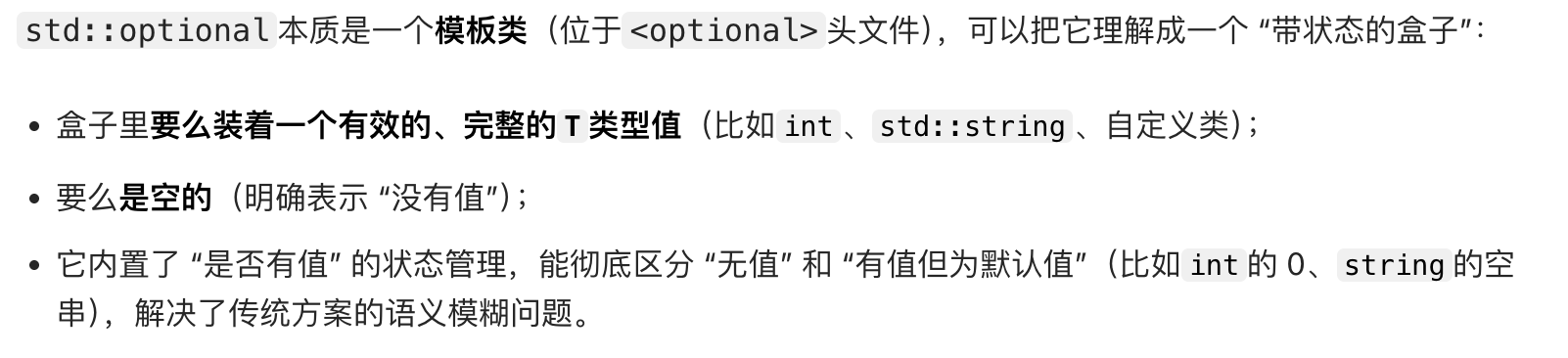
#include <optional>
#include <string>
#include <iostream>
#include <stdexcept>

int main() {
    // 1. 定义与初始化
    std::optional<int> opt_empty;                // 默认:空(无值)
    std::optional<int> opt_null = std::nullopt;  // 显式标记为空(推荐)
    std::optional<int> opt_val(42);              // 有值:42
    std::optional<std::string> opt_str = "hello";// 有值:string("hello")
    auto opt_double = std::make_optional(3.14);  // 推导为optional<double>

    // 2. 判断是否有值(三种等价方式)
    std::cout << "opt_empty是否有值:" << (opt_empty.has_value() ? "是" : "否") << std::endl; // 否
    std::cout << "opt_val是否有值:" << (opt_val ? "是" : "否") << std::endl;             // 是
    std::cout << "opt_empty是否为空:" << (opt_empty.empty() ? "是" : "否") << std::endl;     // 是(C++20新增)

    // 3. 访问值(优先级:value_or > get_if > value/*)
    // 方式1:value_or(默认值) —— 安全!无值返回默认值(最推荐)
    int val_empty = opt_empty.value_or(0);          // 无值→返回0
    std::string val_str = opt_str.value_or("empty");// 有值→返回"hello"
    std::cout << "opt_empty的默认值:" << val_empty << std::endl;  // 0
    std::cout << "opt_str的值:" << val_str << std::endl;          // hello

    // 方式2:value() —— 无值时抛异常(std::bad_optional_access)
    try {
        int val = opt_val.value(); // 有值→42
        // int err = opt_empty.value(); // 无值→抛异常
    } catch (const std::bad_optional_access& e) {
        std::cerr << "访问错误:" << e.what() << std::endl;
    }

    // 方式3:解引用(* / ->)—— 无值时未定义行为!必须先判断
    if (opt_val) {
        std::cout << "opt_val解引用:" << *opt_val << std::endl; // 42
    }
    if (opt_str) {
        std::cout << "opt_str长度:" << opt_str->size() << std::endl; // 5
    }

    // 4. 修改/清空值
    opt_empty = 100; // 从无值→有值(100)
    opt_empty.reset();// 清空→无值

    return 0;
}
标准异常类型
basic
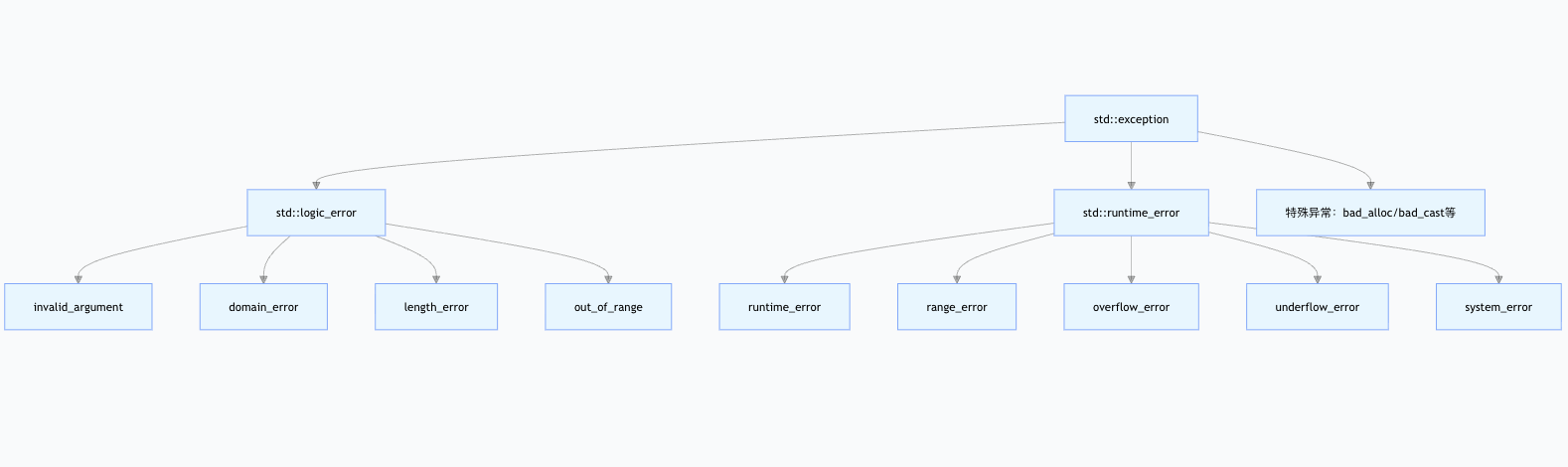
所有标准异常都继承自
std::exception(<exception>头文件)
逻辑错误(std::logic_error)—— 编译前可避免的错误
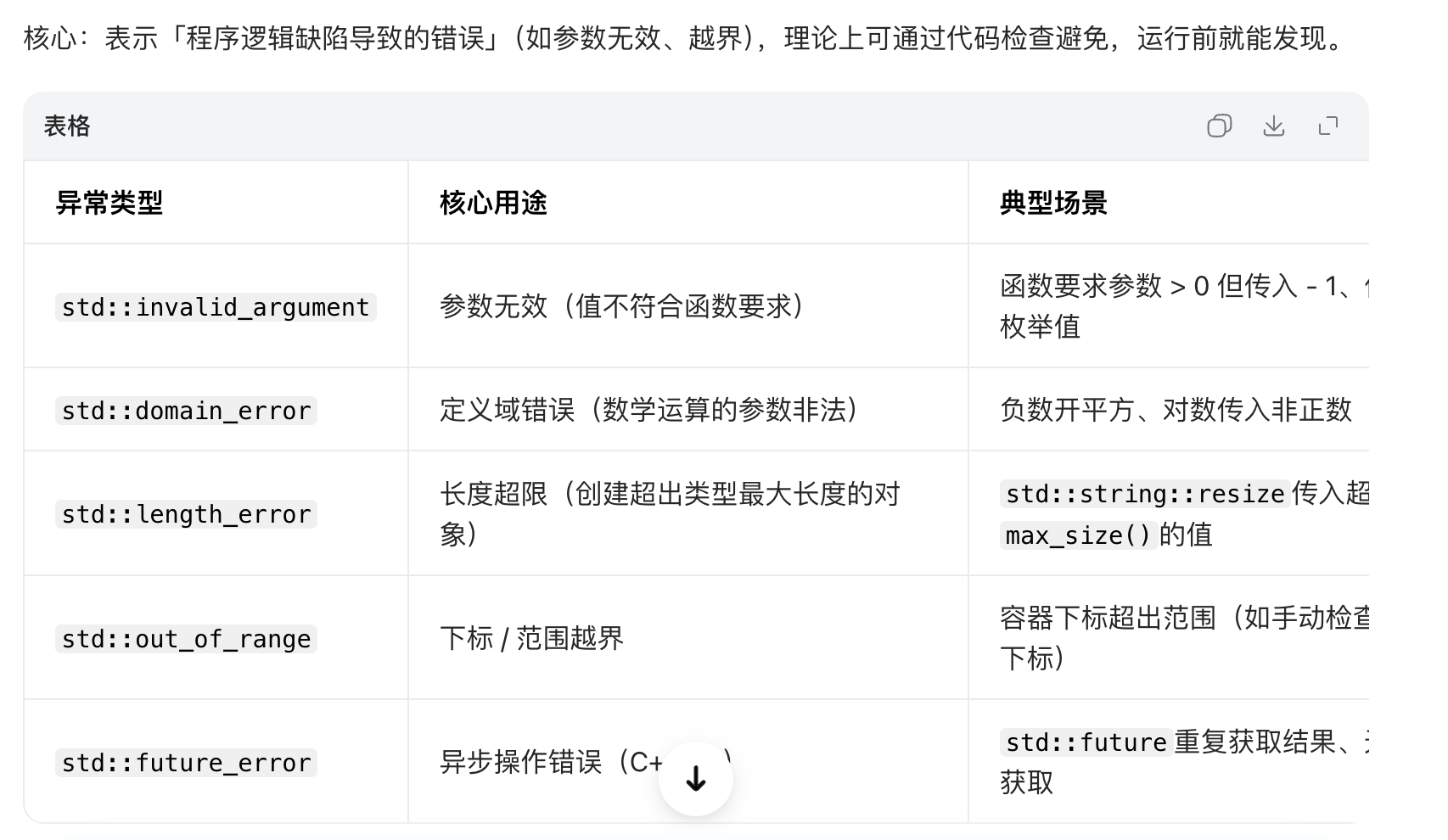
运行时错误(std::runtime_error)
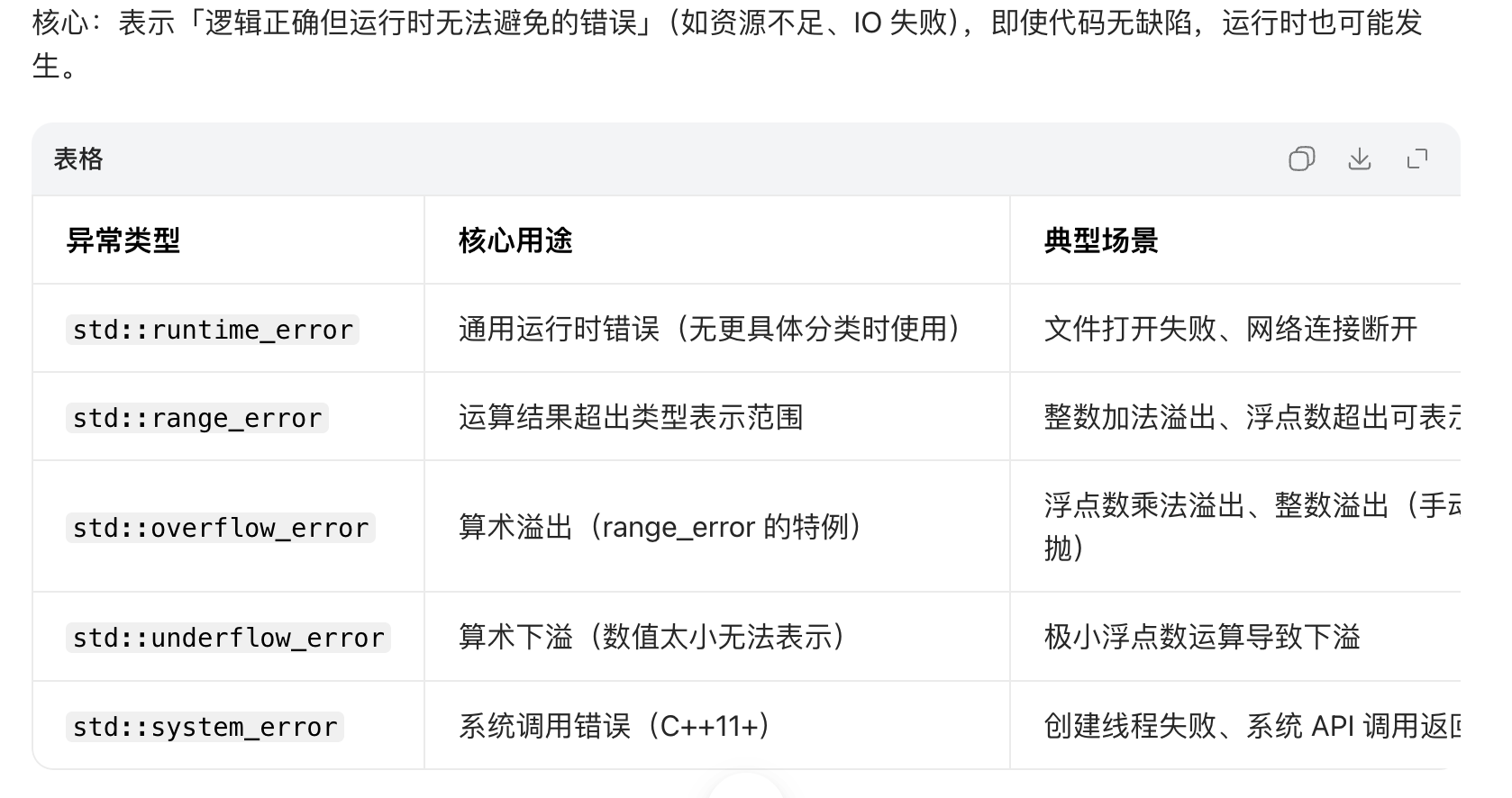
time_t ctime
获取当前系统时间的std::time_t值(最基础)
#include <ctime>
#include <iostream>

int main() {
    // 获取当前时间戳(秒级)
    std::time_t now = std::time(nullptr); // 等价于std::time(NULL)
    std::cout << "当前Unix时间戳:" << now << std::endl;
    // 输出示例:1741000000(对应2026年3月3日)
    return 0;
}将std::time_t转换为可读的字符串
#include <ctime>
#include <iostream>

int main() {
    std::time_t now = std::time(nullptr);

    // 方式1:std::ctime(本地时间,自动带换行)
    std::cout << "本地时间(ctime):" << std::ctime(&now);
    // 输出示例:Tue Mar  3 10:00:00 2026

    // 方式2:先转tm结构体,再用asctime(更灵活)
    std::tm* local_tm = std::localtime(&now);
    std::cout << "本地时间(asctime):" << std::asctime(local_tm);
    // 输出示例:Tue Mar  3 10:00:00 2026

    return 0;
}